Thank you for responding (and attending!)

The clear winner

Can't have advanced without some basics!

Along the way...

ggplot2: a grammar of graphics
- ggplot2 implements the Grammar of Graphics in R.
Any graph can be broken down into the following components:
- Data
- Mappings (i.e. variables to visualize)
- Geoms (e.g., points, lines, rectangles, etc)
- Statistical aggregation
- Positional adjustment
- Scales
- Facets (i.e., small multiples)
- Coordinates
- Theme (i.e., styling)
As a ggplot2 user, all you really need to provide is 1, 2, and 3. Everything thing else has smart defaults.
Helps minimize the cognitive burden, especially during the iteration phase.
Focus on 3 key aspects: Data, Mappings, and Geoms.
library(ggplot2)
ggplot(mtcars) +
  geom_point(mapping = aes(x = wt, y = mpg))

Focus on 3 key aspects: Data, Mappings, and Geoms.
library(ggplot2)
ggplot(mtcars) +
  geom_point(mapping = aes(x = wt, y = mpg, color = am))

Focus on 3 key aspects: Data, Mappings, and Geoms.
library(ggplot2)
ggplot(mtcars) +
  geom_point(mapping = aes(x = wt, y = mpg, color = am))

Focus on 3 key aspects: Data, Mappings, and Geoms.
library(ggplot2)
ggplot(mtcars) +
  geom_point(mapping = aes(x = wt, y = mpg, color = am))

Mappings map data to a visual properties according to a Scale
library(ggplot2)
ggplot(mtcars) +
  geom_point(aes(x = wt, y = mpg, color = am)) +
  scale_color_manual("Transmission", values = c(automatic="blue", manual="red"))

Tip: use color-blind safe palettes (e.g., colorbrewer or Okabe Ito)
library(ggplot2)
ggplot(mtcars) +
  geom_point(aes(x = wt, y = mpg, color = am)) +
  scale_color_brewer("Transmission", type = "qual")

Tip: use multiple visual properties to help distinguish groups
library(ggplot2)
ggplot(mtcars) +
  geom_point(mapping = aes(x = wt, y = mpg, color = am, shape = am))

Outside aes(): set property without scaling
library(ggplot2)
ggplot(mtcars) +
  geom_point(mapping = aes(x = wt, y = mpg, color = am, shape = am), size = 4)

Inside aes(): set property with scaling
library(ggplot2)
ggplot(mtcars) +
  geom_point(mapping = aes(x = wt, y = mpg, color = am, shape = am, size = hp))

Geoms (aka Layers) inherit Data and Mappings from ggplot()
library(ggplot2)
ggplot(mtcars, aes(x = wt, y = mpg, color = am)) +
  geom_point() +
  geom_smooth()

Geoms (aka Layers) inherit Data and Mappings from ggplot()
library(ggplot2)
ggplot(mtcars, aes(x = wt, y = mpg, color = am)) +
  geom_point(aes(shape = am), size = 3) +
  geom_smooth(aes(linetype = am))

Geoms (aka Layers) are parameterized by more than visuals (e.g., Statistics)
library(ggplot2)
ggplot(mtcars, aes(x = wt, y = mpg, color = am)) +
  geom_point(aes(shape = am), size = 3) +
  geom_smooth(aes(linetype = am), method = "lm", se = FALSE)

Use Facets to see how patterns change across sub-groups
library(ggplot2)
ggplot(mtcars, aes(x = wt, y = mpg, color = am)) +
  geom_point(aes(shape = am), size = 3) +
  geom_smooth(aes(linetype = am), method = "lm", se = FALSE) +
  facet_wrap(~cyl)

Tip: format the data value for presentation
library(ggplot2)
ggplot(mtcars, aes(x = wt, y = mpg, color = am)) +
  geom_point(aes(shape = am), size = 3) +
  geom_smooth(aes(linetype = am), method = "lm", se = FALSE) +
  facet_wrap(~paste("Cylinders:", cyl))

Tip: most important comparisons within panel
library(ggplot2)
ggplot(mtcars, aes(x = mpg, color = am)) +
  geom_density() +
  facet_wrap(~paste("Cylinders:", cyl))

Much easier to compare cylinders this way!
library(ggplot2)
ggplot(mtcars, aes(x = mpg, color = factor(cyl))) +
  geom_density() +
  facet_wrap(~am)

Trouble with ggplotly()? Try plot_ly()!
plot_ly() is a more "direct" interface to the underlying plotly.js (JavaScript) library.
plot_ly(mtcars) %>%
  add_markers(x = ~wt, y = ~mpg, color = ~am)
plot_ly(): also inspired by grammar of graphics
Focus on 3 key aspects: Data, Mappings, and Geoms.
plot_ly(mtcars) %>%
  add_markers(x = ~wt, y = ~mpg, color = ~am)
plot_ly(): embraces the pipe
To add to (or modify) a plotly object, use %>% instead of +
plot_ly(mtcars) %>%
add_markers(x = ~wt, y = ~mpg, color = ~am)
Good practice: pre-attentive features
Use multiple perceptual channels (i.e., color, symbol, linetype) to distinguish groups.
plot_ly(mtcars) %>%
  add_markers(x = ~wt, y = ~mpg, color = ~am, symbol = ~am)

Tip: Scale up with toWebGL() (also works with ggplotly())
plot_ly(diamonds) %>%
  add_markers(x = ~carat, y = ~price) %>%
  toWebGL()

toWebGL() changes rendering to HTML Canvas instead of SVG. The difference is similar to using png() instead of pdf() for static plots (lower-quality, but way more scalable).
Tip: Combat overplotting with alpha blending
plot_ly(diamonds) %>%
  add_markers(x = ~carat, y = ~price, alpha = 0.1) %>%
  toWebGL()

Tip: Combat overplotting with summaries
plot_ly(diamonds) %>%
  add_histogram2d(x = ~carat, y = ~price)

For "heavy-tailed" distributions, it can be useful to perform the summary (e.g., log counts) in R yourself. For more on this, see https://plotly-r.com/frequencies-2d
These are daily downloads, which dip on weekends!
plot_ly(logs) %>% add_lines(x = ~date, y = ~count, color = ~package)
Apply a weekly rolling average to see the trend
logs$weekly_avg <- zoo::rollapply(logs$count, 7, mean, fill = "extend")plot_ly(logs) %>% add_lines(x = ~date, y = ~weekly_avg, color = ~package)
Use log scale to more easily compare
plot_ly(logs) %>% add_lines(x = ~date, y = ~weekly_avg, color = ~package) %>% layout(yaxis = list(type = "log"), hovermode = "compare")
Which is better? Why?
subplot(shareX = TRUE, nrows = 2, plot_ly(logs) %>% add_heatmap(x = ~date, y = ~package, z = ~weekly_avg), plot_ly(logs) %>% add_lines(x = ~date, y = ~weekly_avg, color = ~package))
Which is better if we increase the number of packages?


heatmap: better at displaying overall structure

(Especially if we place "similar" packages near one another, which is easy thanks to heatmaply!)
Cognostics: associate each viz with numerical summaries
Imagine having many panels of scatterplots to sift through. If we attach numerical summaries to each (e.g., slope, intercept, etc), we could use that to inform which panels to view

Cognostics: associate each viz with numerical summaries
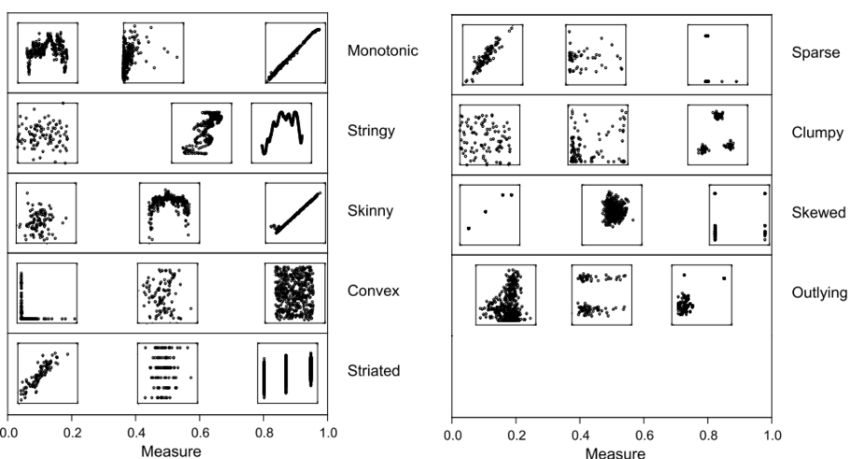
These are nine scagnostics (scatterplot-cognostics) measures from (Wilkinson and Wills, 2008). Same concept can be applied to time series (see tsfeatures package).
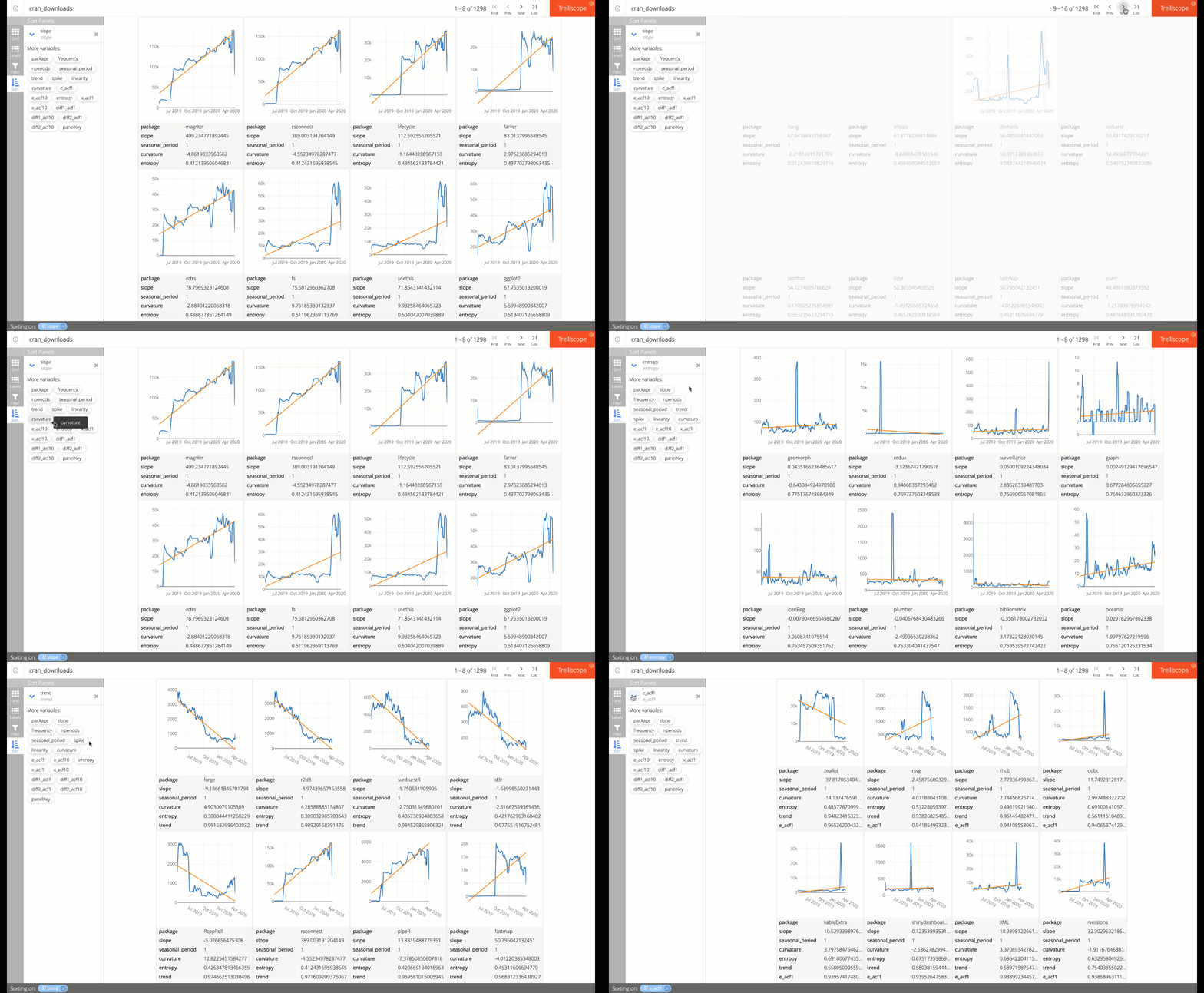
trelliscopejs: use cognostics to guide your exploration
Idea: Use biplots to get an overview of the feature space
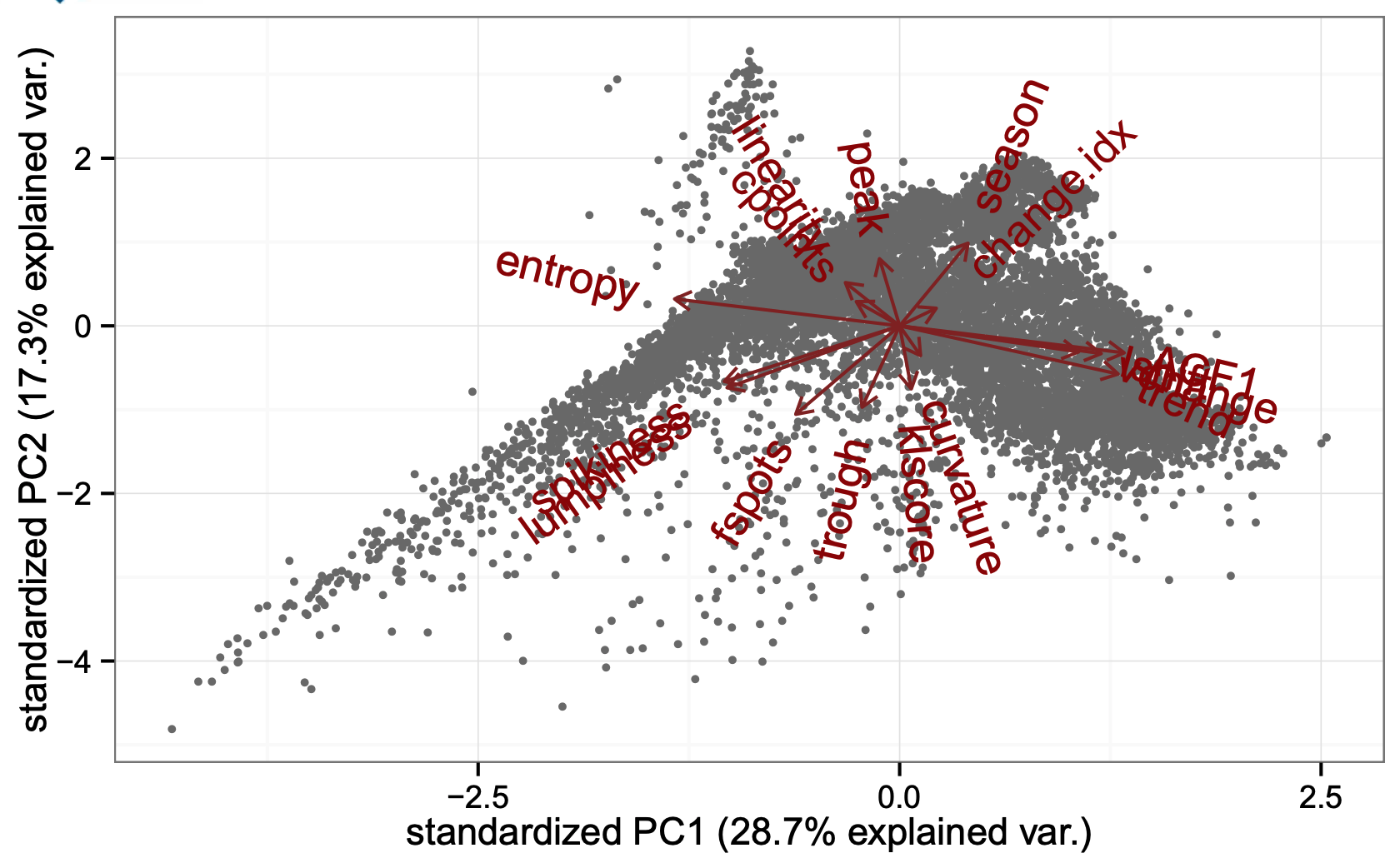
Image from Rob Hyndman's lecture on "Visualisation of big time series data"